A thrilling party game where you play as a roomba with the goal to collect the most dirt.
About
Project_Clean is a fun and fast-paced party game where you take control of a quirky Roomba on a mission to collect the most dirt! In this lively arena, you’ll navigate around obstacles and sweep up scattered messes, using strategically placed power-ups to give you an edge.
With power-ups like speed boosts that let you zip across the map and size increases that allow you to vacuum up more dirt, every match brings new opportunities for clever strategies and fast-paced action.
Project Details
Game Title: NA
Genre: Party
Platform: PC
Development Tools: Unreal Engine, C++
Game Features:
The replicated movement system in the multiplayer Roomba game ensures that player actions are consistently mirrored across all connected devices in real time. This system supports smooth movement and synchronized gameplay. The feature is built on Unreal Engine's replication system, enabling server-client communication to maintain accurate and fair gameplay.
Implementation
Player inputs (e.g., moving left, right, up, or down) are captured using Unreal's Enhanced Input System.
Directional inputs update a replicated variable CurrentDirection, which determines movement logic.
The MovePlayer function calculates a new location based on the current direction and speed.
The server validates and applies these movements using a Remote Procedure Call (RPC), ensuring authoritative control.
Design Approach
The server maintains authoritative control over movement, ensuring fair play and consistency. Only critical variables like direction and speed are replicated, reducing network overhead. Client-side prediction ensures that players experience real-time movement while the server processes and confirms updates.
Click for details
×
Replicated Player Movement in Multiplayer This video demonstrates the smooth synchronization of player movement in a multiplayer environment, where the server handles all movement calculations while ensuring that clients are responsive and synchronized. Watch as player positions are correctly replicated across all connected clients, providing seamless gameplay despite network latency.
Server Movement Logic
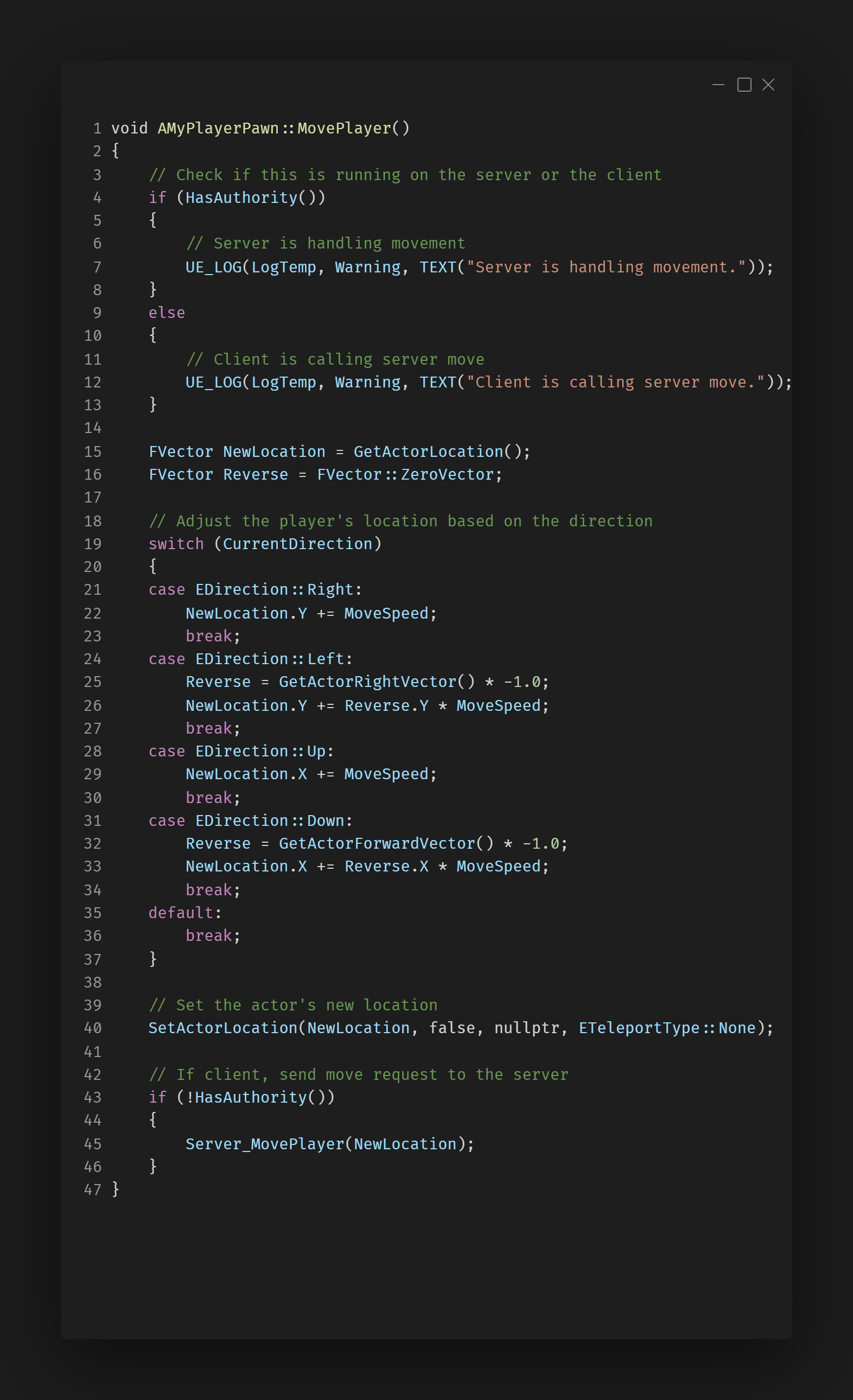
This function moves the player based on input direction (CurrentDirection) and updates the player's position.
If it's the client, the Server_MovePlayer function is called to replicate the movement on the server, ensuring consistency.
Server Move Player Function
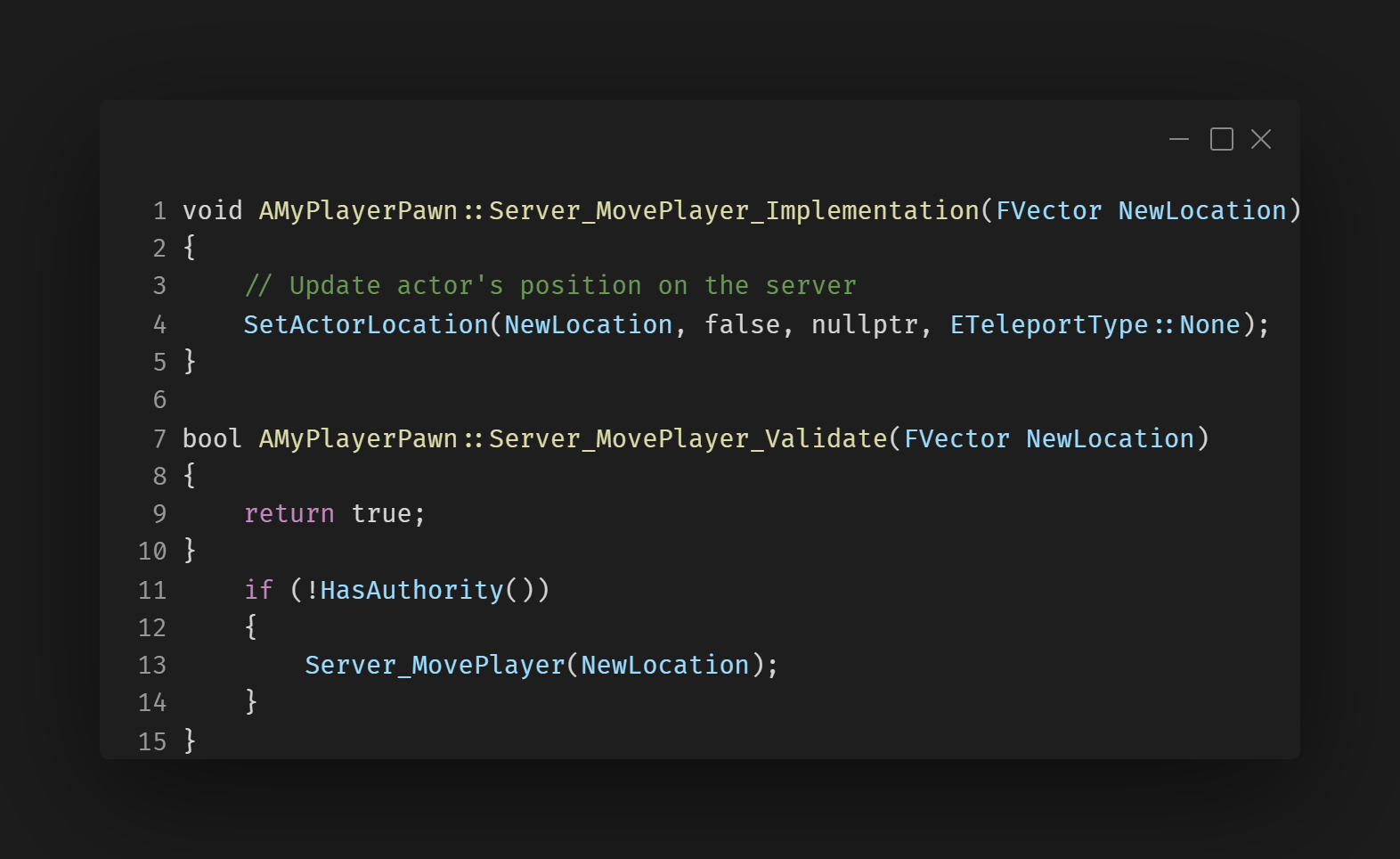
Server_MovePlayer_Implementation updates the player’s location on the server when the client sends the request.
The Server_MovePlayer_Validate function allows you to add validation if needed (e.g., checking if the new position is valid).
Replicating Player Direction (State Replication)
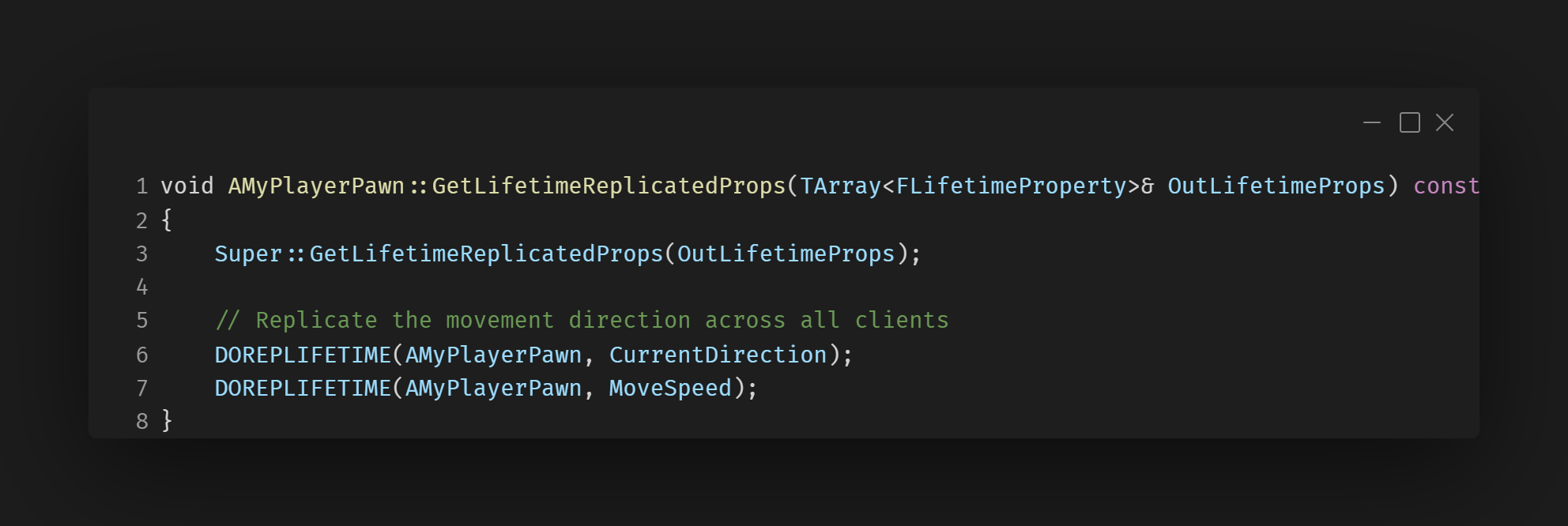
The GetLifetimeReplicatedProps function ensures that variables like CurrentDirection and MoveSpeed are replicated to all clients.
DOREPLIFETIME is used to indicate which properties should be replicated and synchronized across all instances.
Challenges
Server-Side Movement Replication and Client Synchronization
Challange:
Ensuring that the server was the ultimate authority on player movement to prevent any form of cheating or desynchronization. Clients need to display smooth movement to the player, even with network latency, to maintain a responsive gameplay experience.
Solution:
The solution to this problem was to employ a combination of server-side authority and client-side prediction to handle player movement effectively while minimizing the impact of network latency.
Description
This system ensures dirt objects are spawned dynamically in a multiplayer environment, with proper replication across the server and clients to maintain gameplay synchronization.
Implementation
The dirt spawning system utilizes Unreal Engine's replication features to ensure consistency between the server and all connected clients.
The server, acting as the authoritative entity, initiates the spawning process. During the BeginPlay() lifecycle, the server checks for authority and calls the SpawnDirt() function.
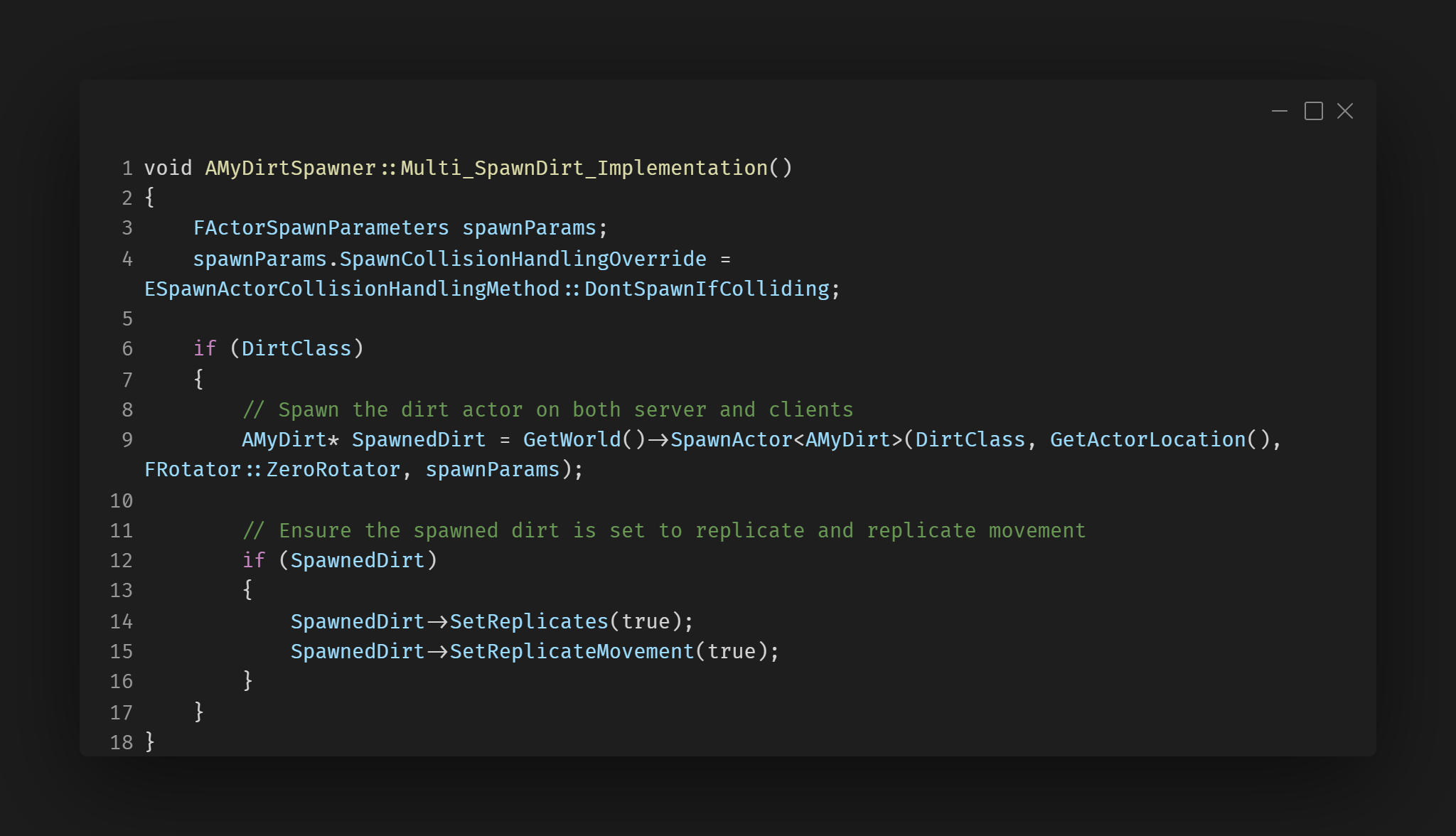
The server calls the Multi_SpawnDirt() multicast function to ensure that the dirt actors are instantiated on all connected clients. The spawned dirt actor is configured to replicate itself and its movement.
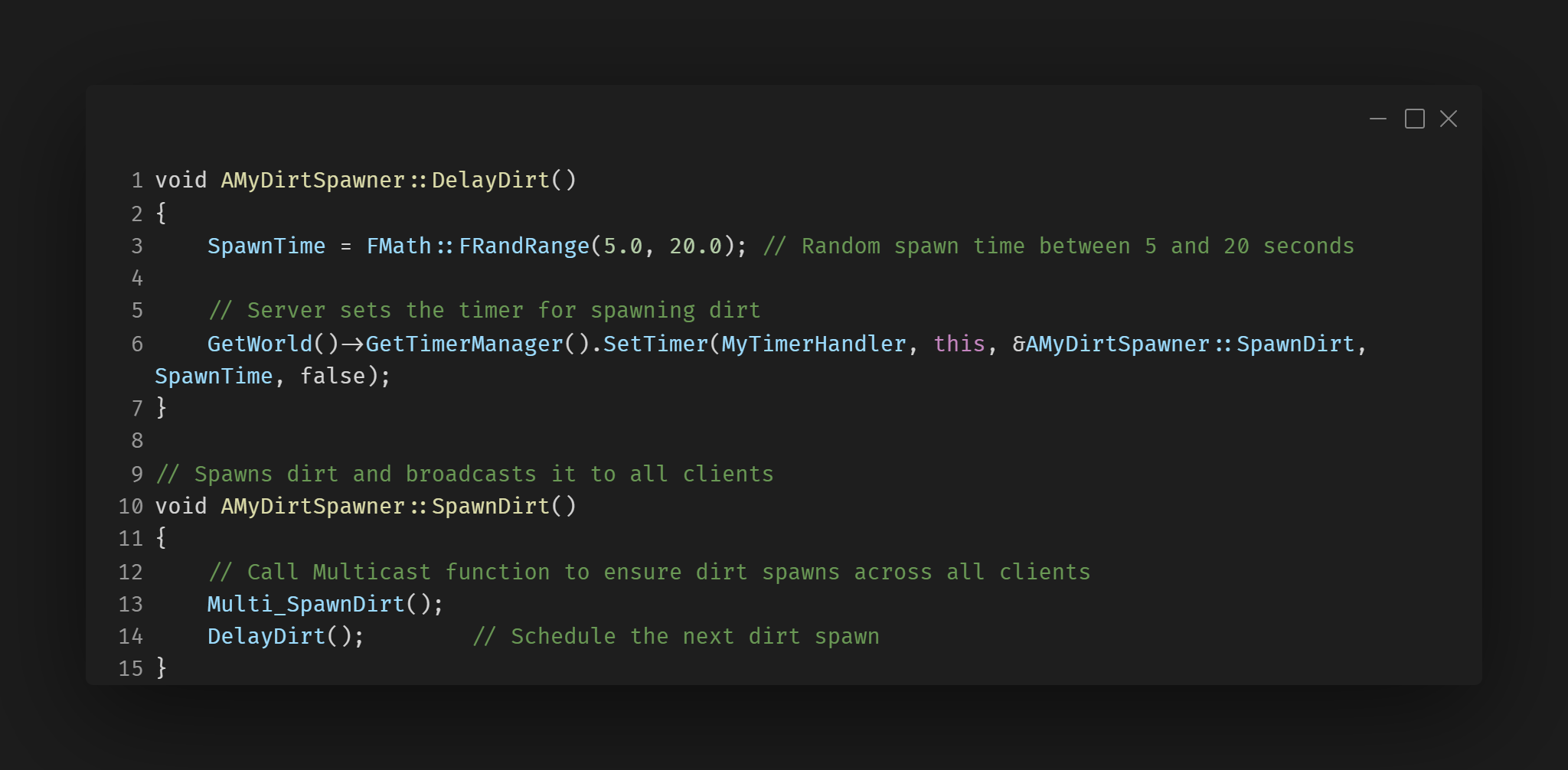
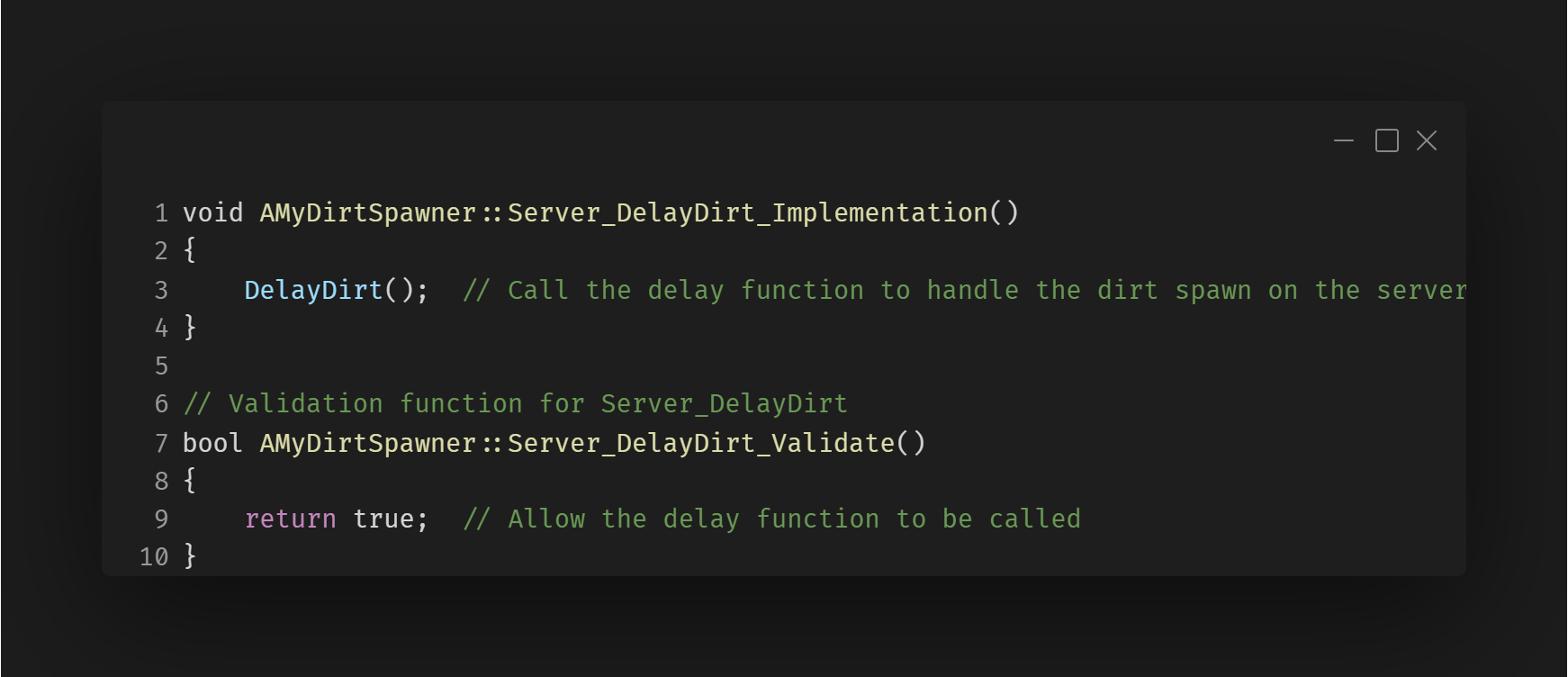
A randomized delay is applied between spawn events using the DelayDirt() function. This introduces variability in the spawn timing, controlled by the server to maintain consistency.
Design Approach
The Multi_SpawnDirt() function ensures that spawned dirt appears simultaneously across all the clients, creating a synchronized gameplay experience.
Click for details
×
Dirt Spawning The video shows how the spawning of dirt is multicasted allowing them to spawn in at the same time.
Server Authority and Delayed Dirt Spawning
This snippet demonstrates how the server handles the authority for spawning dirt with a randomized delay using Unreal Engine's TimerManager. The server controls when dirt is spawned, ensuring synchronization across clients.
Server-side Timer Handling for Dirt Delay
This snippet demonstrates how the server ensures that dirt spawning is properly delayed. The Server_DelayDirt_Implementation() ensures that the server controls when the dirt spawn timer is set.
Multicast Replication for Spawning Dirt on All Clients
This snippet handles the multicast functionality to ensure dirt is spawned on all connected clients, not just the server. It uses Unreal Engine's Multi_SpawnDirt_Implementation() to synchronize the spawn across clients.
Challenges
Spawning Dirt Synchronization
Challange:
Ensuring that the dirt spawning system is synchronized so that dirt appears at the same time on both the server and clients was a key challenge. When using timers, discrepancies could arise due to network latency or inconsistent local timer handling, leading to mismatched spawn times between the server and clients.
Solution:
The solution was to centralize all timer-based spawning logic on the server. The server initiated the spawning process, including the randomized delay between spawns, and used a multicast function to replicate the spawning event to all connected clients.
Description
The replicated power-up system allows players to collect, store, and activate power-ups in a multiplayer environment. These power-ups (e.g., speed boost or size change) are spawned dynamically in the game world, collected by players, and their effects are replicated across all clients to ensure consistent gameplay. The system ensures synchronization so that all players can see and interact with the same power-ups. Additionally, when a power-up is used, its visual and gameplay effects (such as changes to movement speed or player size) are also replicated, ensuring consistency in how players perceive these effects.
Implementation
Power-ups are spawned dynamically in the game world at random locations. The server maintains authority over their lifecycle, ensuring that their spawning, collection, and usage are synchronized across all connected clients. When a player collects or activates a power-up, the server communicates these changes to other clients. This includes updating static meshes, altering movement parameters, or changing player states to reflect the power-up’s effects.
Design Approach
The Multi_SpawnDirt() function ensures that spawned dirt appears simultaneously across all clients, creating a synchronized gameplay experience. Similarly, the power-ups are replicated so that their effects, such as speed boosts or size changes, are visible to both the client using them and all other connected players. This approach uses Unreal Engine's replication framework to synchronize visual changes and gameplay mechanics across clients, ensuring fairness and consistency in the multiplayer environment.
Click for details
×
Replicated Powerup Spawning The video shows how powerups are multicast allowing for them to spawn at the same time and location as in the client and the server.
Replicated Power-Up Effects This video showcases the replication of power-up effects in a multiplayer environment. It highlights how a power-up collected by a player on the client is reflected in real-time on the server, ensuring consistent gameplay experiences for all participants. The effects, including changes to player attributes like speed or size, are visibly synchronized between the client and server, demonstrating the robust implementation of Unreal Engine’s replication system.
Powerup Spawning
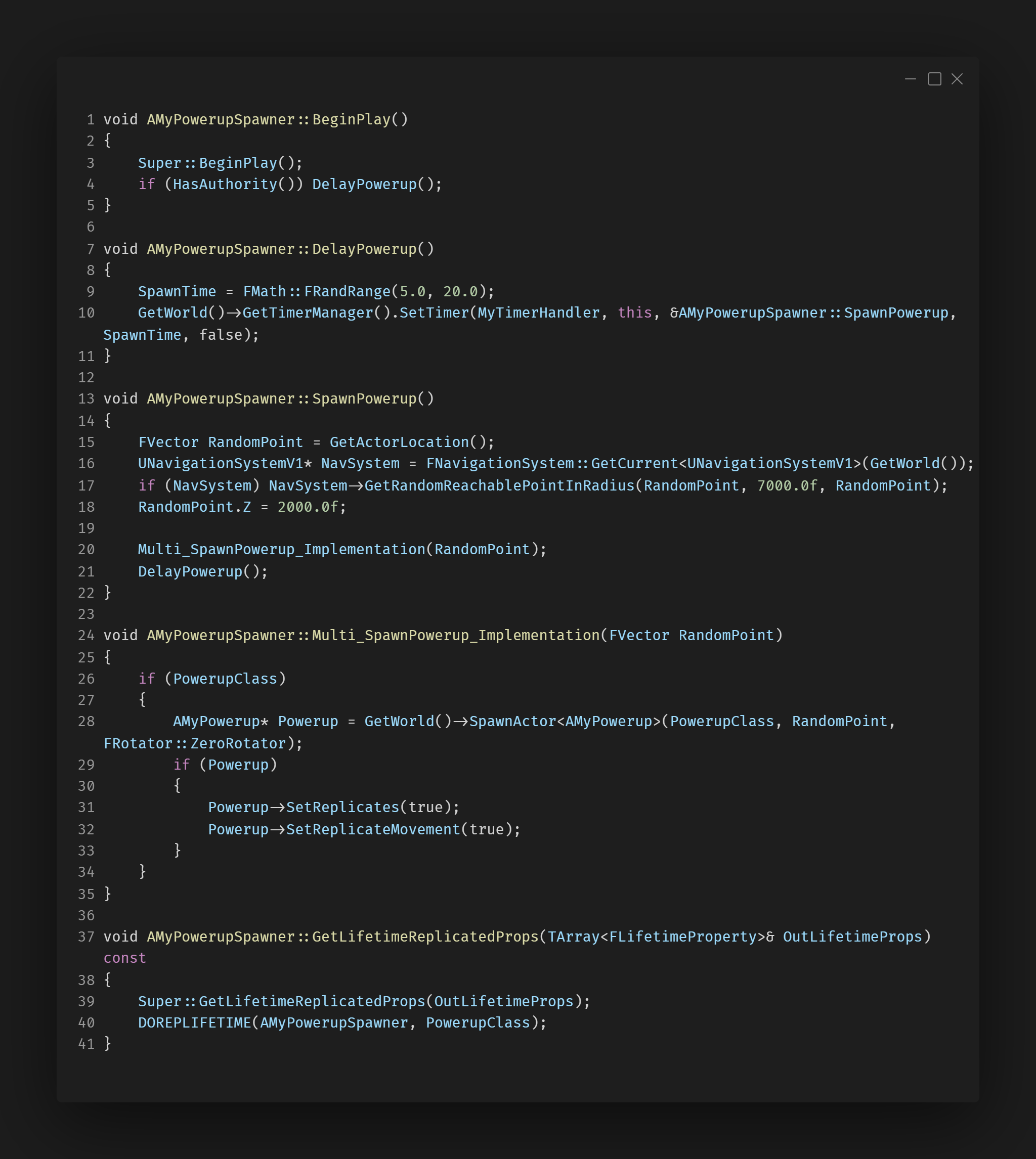
The power-up spawns after a random delay between 5 to 20 seconds, which is only triggered on the server side using DelayPowerup().
The spawn point is calculated using Unreal's Navigation System, ensuring the power-up appears at a reachable, valid position within a specified radius.
The Multi_SpawnPowerup_Implementation function ensures that when a power-up is spawned, it is replicated across all clients in the game, including its movement and interaction. This is done by enabling SetReplicates(true) and SetReplicateMovement(true) for the spawned actor.
After each spawn, the timer is reset, continuously generating power-ups at random intervals and locations, creating a dynamic gameplay experience.
Activating Speed Power-Up
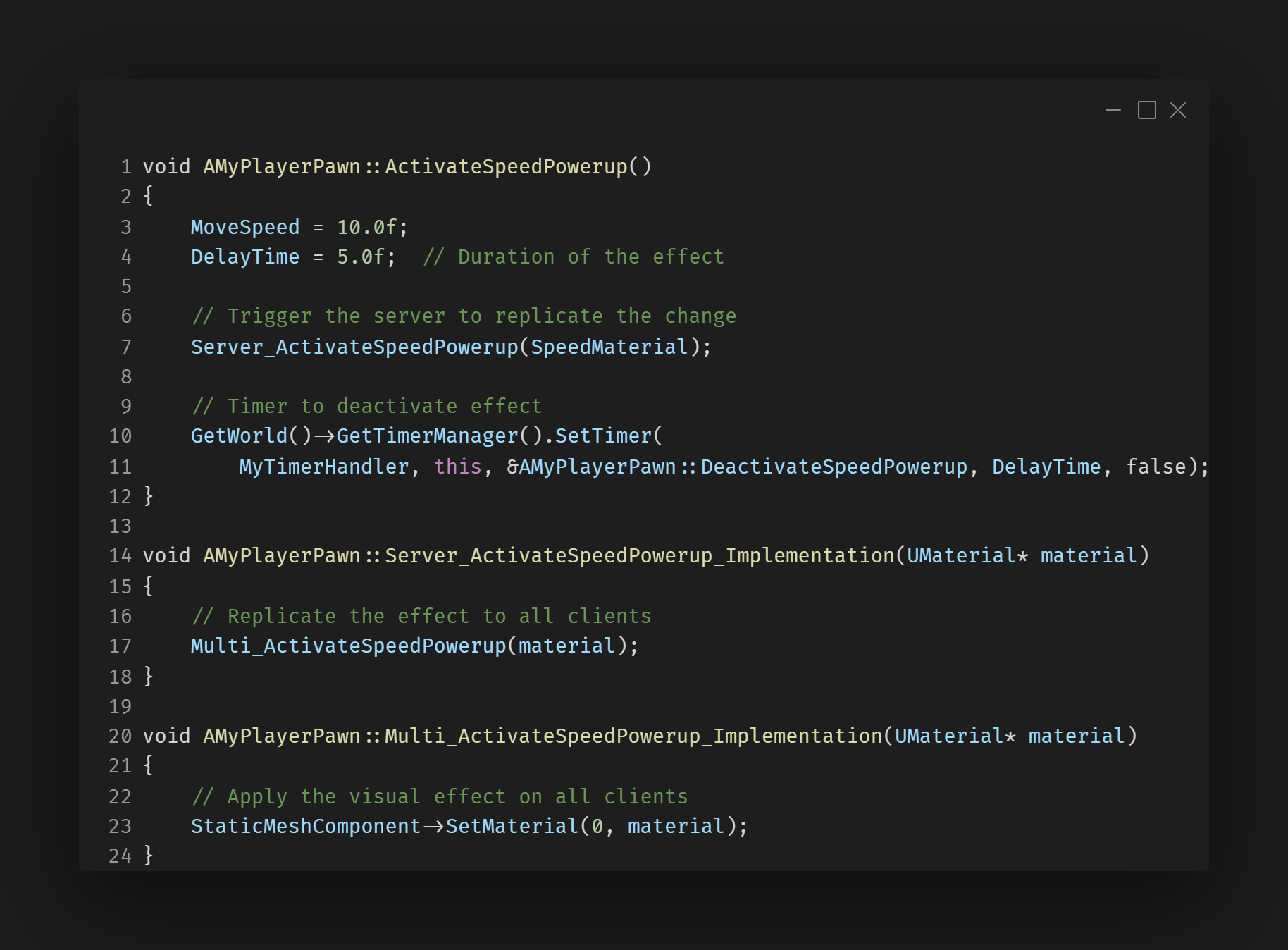
This snippet demonstrates how the speed power-up is activated in a multiplayer game. The server ensures the effect (increased speed and material change) is replicated across all clients for synchronized gameplay.
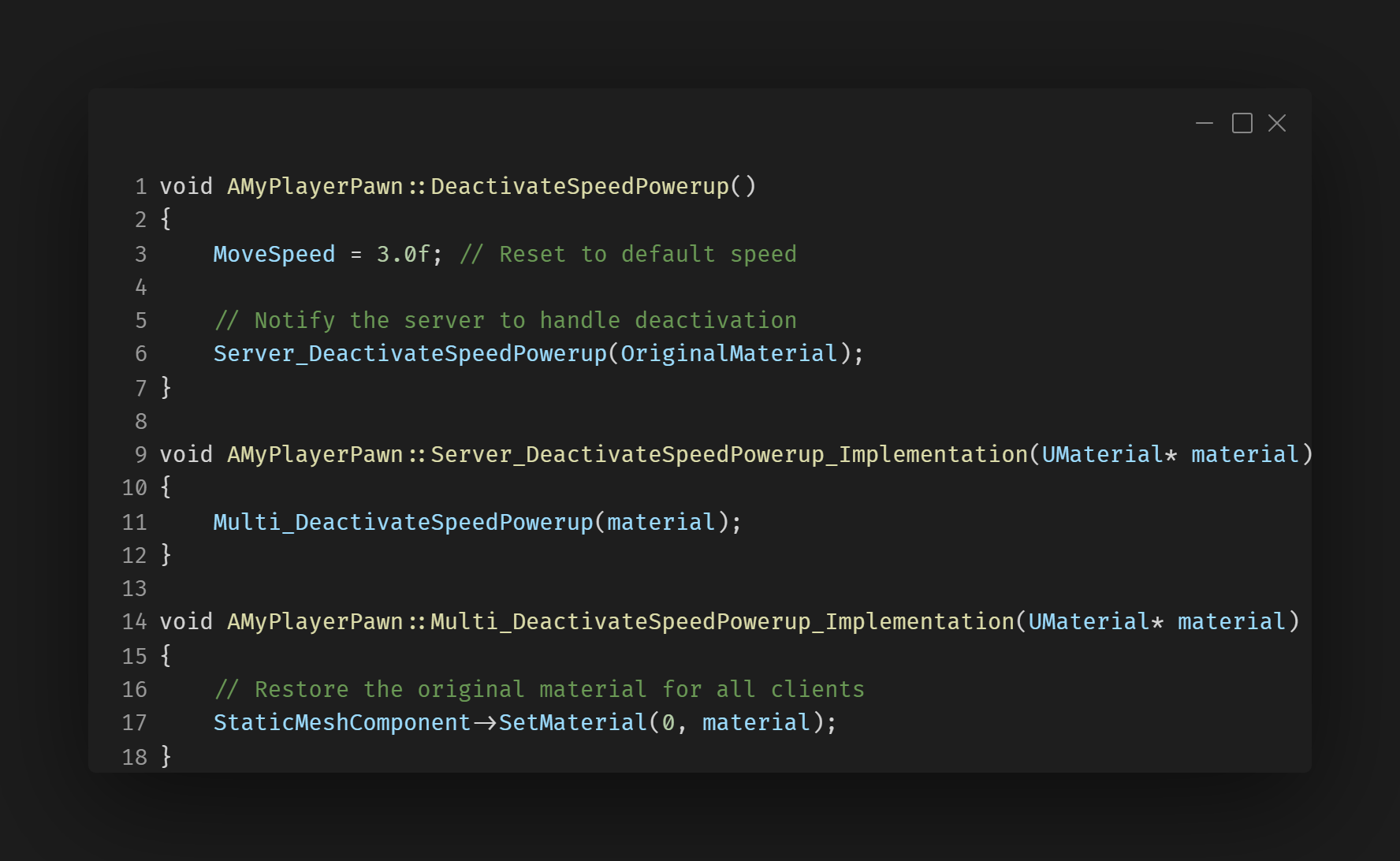
Deactivating Speed Power-Up
This snippet highlights how the speed power-up is deactivated. It ensures the player’s movement speed and appearance return to their default state across the server and all connected clients.
Challenges
Powerup Authority Handling
Challange:
One of the issues is if the client is to pick up two powerups and use them it will prevent them from being able to pick up any more powerups after.
Solution:
To solve this I need to make sure all the powerup get/use logic uses server side handling to make sure the server keeps track how many powerups the clients have so they will be then be able to pick up more powerups.
What I Learnt
Hybrid Classes:
This project was my first experience using both C++ and Blueprints together to create hybrid classes. I learned how to effectively balance tasks between C++ and Blueprints, utilizing C++ for more complex logic such as player movement and power-up selection, while offloading collision detection and other simpler tasks to Blueprints, where they are easier to manage. This approach allowed me to optimize the workflow and leverage the strengths of both systems, resulting in a more modular and manageable codebase. Moving forward, I plan to continue using hybrid classes to streamline game development, especially in projects where performance and flexibility are key.